Products
Vesting schedules
Create cliff, linear, or stepped release schedules with clear claim fees and worked examples.
On this page
Vesting deposits a complete Fungible Asset allocation into an isolated vault and releases it over an immutable schedule. The beneficiary may claim more than once; every claim transfers only the newly vested amount after the snapshotted protocol fee.
When to use it#
Vesting is suitable for:
- team or adviser allocations released over months or years;
- investor allocations with a cliff followed by gradual release;
- grant programs with discrete release milestones; or
- any allocation that needs partial claims rather than one fixed unlock.
Use a token lock when the entire allocation should release at one date. Use a payment stream for continuous payroll-style accrual with an optional creator cancellation policy.
Schedule types#
| Schedule | Release behavior | Typical use |
|---|---|---|
| Cliff | Nothing releases before the end; the complete allocation releases at once. | One delayed allocation |
| Linear | Nothing releases before the cliff, then cumulative value grows linearly to the end. | Team or adviser vesting |
| Stepped | Uniform portions release at a bounded number of discrete steps. | Monthly or quarterly grants |
All boundaries use on-chain UTC timestamps, not the user's browser clock.
Before you start#
You need the token metadata address, full allocation balance, beneficiary address, final schedule, and enough SUPRA for network gas. There is no fixed protocol fee when creating a vesting schedule, but the claim fee rate in effect at creation is snapshotted into the new position. The rate is governed, read live from the on-chain fee schedule, and can never exceed the immutable 1% cap.
The creator should explain the gross allocation, fee rate, expected net amount, and schedule to the beneficiary before signing.
Create a schedule#
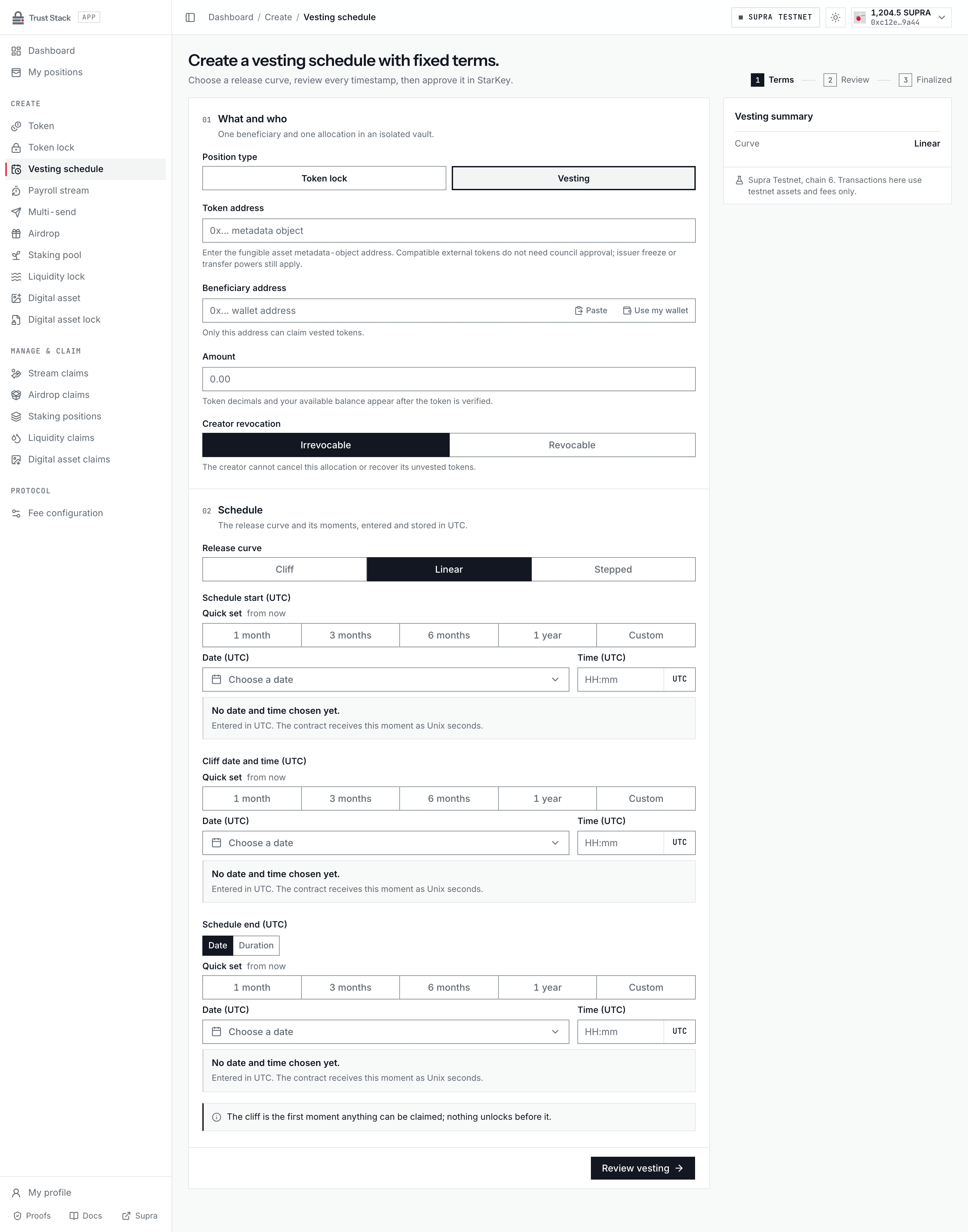
- Open Create vesting (Create > Vesting schedule in the dApp sidebar) and connect StarKey.
- In What and who, enter the token metadata address in Token address and confirm the verified name, symbol, decimals, and your balance.
- Enter the immutable Beneficiary address and the gross Amount.
- Under Creator revocation, keep Irrevocable (the default) or choose Revocable.
- In Schedule, choose the Release curve: Cliff, Linear, or Stepped.
- Set Schedule start (UTC), Cliff date and time (UTC), and, for linear and stepped curves, Schedule end (UTC). Each field uses the UTC date-time picker; the end can also be set as a duration from the schedule start. For stepped vesting, choose the Number of release steps. The start must be at least three minutes ahead.
- Select Review vesting and inspect the proof sheet: token, token origin, beneficiary, amount, revocation policy, curve, start, cliff, end, release steps, and the live unlock fee rate.
- Select Approve in StarKey, sign once, and wait for the matching vesting-created event.
- Save the vesting object address and transaction hash, or open View vesting proof.
The full gross allocation is moved into the vault during creation. No unfunded vesting promise can be created.
Practical example#
A contributor receives a gross allocation of 120,000 EXR vesting linearly over 12 months after a
3-month cliff.
- Before the cliff, claimable value is zero.
- With an example snapshotted rate of 1%, if
30,000 EXRis gross vested at the first claim, the fee is300 EXRand the contributor receives29,700 EXRnet. - At that example rate, if the full
120,000 EXReventually vests, the cumulative fee is1,200 EXRand cumulative net beneficiary value is118,800 EXR. - Claiming monthly or claiming once at the end produces the same cumulative fee, apart from each transaction having its own network gas cost.
The fee is charged in EXR, the vested asset—not in SUPRA.
Fees and costs#
| Action | Trust Stack protocol fee | Who pays or bears it | Other cost |
|---|---|---|---|
| Create vesting position | None | Nobody | Creator supplies full allocation and pays network gas |
| Claim vested tokens | Snapshotted rate, at most 1%, of cumulative gross released value | Deducted from beneficiary's gross claim | Beneficiary pays network gas |
| Sweep accrued fees | None | Transaction signer | Supra network gas |
| Read a schedule | None | Nobody | None |
The fee rate is snapshotted when the position is created. A later fee change affects new positions, not an existing schedule. Cumulative integer accounting prevents a beneficiary from reducing the total fee by splitting one claim into many smaller claims.
The creation transaction includes a user-approved maximum fee rate and aborts if the live rate exceeds it. After creation, claims use the position's immutable fee snapshot rather than a changing live rate. A failed claim cannot leave a protocol fee behind, although network gas may still be charged. See Fee governance.
Claim vested tokens#
- Connect the beneficiary wallet and open My positions.
- Open the Vesting tab and select Claim (or View) on the exact vesting position.
- On the claim page, verify the vesting terms read from Supra: beneficiary, token metadata, revocation policy, total allocation, remaining amount, schedule start, cliff, schedule end, and vault object. The release schedule chart shows the curve.
- Review Gross available and the Unlock fee at the snapshotted rate.
- Select Claim followed by the net amount after the fee, approve in StarKey, and wait for the finalized event.
- Confirm cumulative gross, cumulative fee, beneficiary net, and expected vault balance reconcile.
Anyone may later trigger a sweep of accrued fees, but the destination is fixed to the configured collector. The caller cannot redirect them.
What is guaranteed#
- The gross allocation is fully funded at creation.
- Schedule, token, beneficiary, amount, and fee snapshot are immutable.
- Only the beneficiary can claim vested principal.
gross claimed ≤ vested ≤ totalis enforced in base units.- One position cannot change another position.
- The final eligible claim and final fee sweep should empty the accounted vault exactly.
The historical revision-2 deployment has no creator revocation, pause, beneficiary replacement, or emergency seizure path.
Optional revocation#
The active immutable revision-6 deployment (module version 4) keeps the vesting interface introduced in module version 3 and offers Irrevocable (default) or Revocable under Creator revocation in the creation form. Revocable schedules created on the retained claim-only revision-5 package keep the same revocation rules. This choice is permanent and is included in the creation receipt and public proof.
Only the original creator of a revocable schedule can stop future vesting. The transaction refunds the unvested principal to that creator and leaves already vested tokens in the vault for the beneficiary to claim under the original fee snapshot. Revoking before the cliff refunds the full allocation; revoking after full vesting is rejected. Previously claimed tokens cannot be recovered.
For example, if an allocation of 10,000 tokens has vested 4,000 tokens at execution time, revocation refunds 6,000 tokens to the creator. The beneficiary retains the right to the vested 4,000 tokens, minus any earlier gross claims and the original claim fee. The creator refund has no protocol fee; the creator pays network gas.
Connect the creator wallet, open the exact position's claim page from My positions, choose Review revocation, inspect the refund estimate and beneficiary protection, and then sign Revoke unvested tokens. Keep schedule closes the review without a transaction. The exact refund uses chain execution time. If confirmation is interrupted, use the same action to recheck the saved transaction; do not create another transaction manually.
Administrators cannot switch an irrevocable position to revocable, alter its beneficiary or schedule, or seize its funds. Existing revision-2 positions keep their original rules.
Common problems#
- Nothing claimable: the cliff or next release step has not been reached on-chain.
- Net amount is lower: the page shows gross, the protocol fee, and net separately.
- Claiming frequently: the percentage fee is unchanged, but more claims mean more network gas.
- Wrong schedule: timestamps and schedule type cannot be edited after creation.
- Position missing: use the direct vesting object address while indexer discovery catches up.