Products
Merkle airdrops
Publish a fully funded claim campaign with portable proofs, exact costs, and recovery rules.
On this page
A Merkle airdrop commits many wallet allocations to one SHA3-256 root while storing only the root, campaign state, and claimed indexes on-chain. Recipients use a public manifest to reproduce their allocation proofs and claim directly.
When to use it#
Use an airdrop when:
- recipients should choose when to claim;
- the creator does not want to submit a transfer for every wallet;
- the distribution needs a defined claim window and later unclaimed-fund recovery; or
- recipients or auditors need portable allocation proofs.
Use multi-send for immediate transfers to no more than 100 wallets in one atomic transaction.
Before you start#
Prepare the token metadata address, unique recipient allocations, complete funding balance, claim start, claim end, and a later reclaim timestamp. The campaign creator also needs SUPRA for creation gas. Every claimant needs a copy of the exact generated manifest and enough SUPRA for claim gas.
The manifest is operationally essential. The on-chain root alone does not contain enough data for a recipient to reconstruct a proof.
Create a campaign#
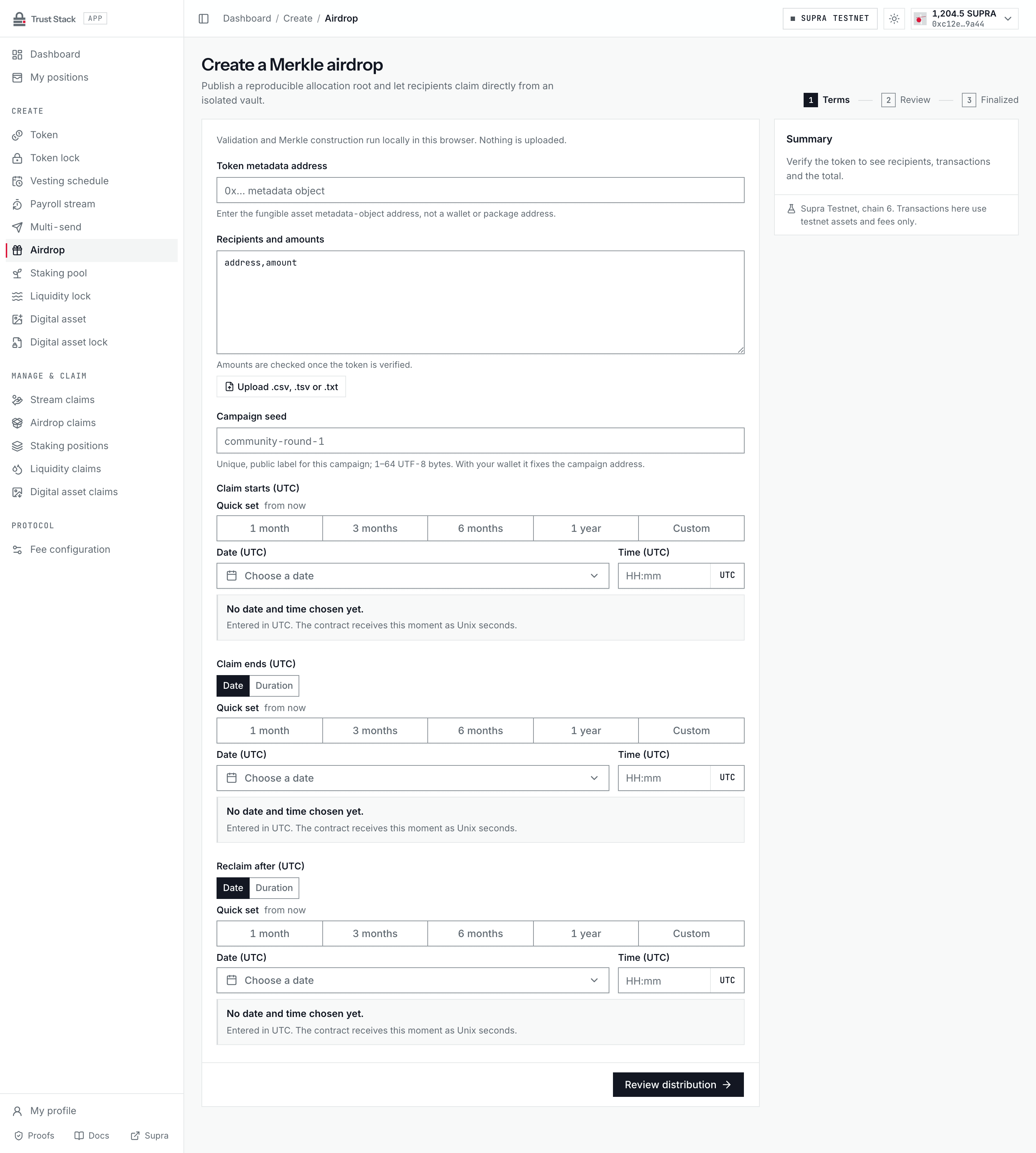
- Open Create airdrop (Create > Airdrop in the dApp sidebar) and connect the campaign creator's wallet.
- Enter the Token metadata address and confirm the verified token and creator balance.
- Paste unique recipient addresses and positive amounts into Recipients and amounts, or upload
a
.csv,.tsv, or.txtfile. Validation and Merkle construction run locally in the browser. - Enter a Campaign seed: a unique public label of 1 to 64 UTF-8 bytes that, with the creator address, fixes the campaign address.
- Set Claim starts (UTC), Claim ends (UTC), and Reclaim after (UTC) with the UTC date-time picker. The end and reclaim times can also be set as a duration from the previous time. The claim start must be at least two minutes ahead.
- Select Review distribution and check the campaign address, Merkle root, seed, token, total allocation, every recipient, and the claim and reclaim times.
- Download the claim manifest from the review before signing. A copy is also saved in the browser.
- Select Create airdrop campaign, sign the fully funded creation transaction, and wait for the matching campaign-created event.
- Publish the manifest at a durable public location (Download claim manifest remains available after creation) and share its hash through an independent channel so recipients can detect replacement.
The manifest records chain ID 6, package address, campaign object, asset, indexes, recipients,
amounts, leaves, proofs, root, schedule, and creation transaction.
Practical example#
A community allocates 100,000 EXR:
| Recipient | Allocation |
|---|---|
| Alice | 20,000 EXR |
| Bob | 30,000 EXR |
| Carol | 50,000 EXR |
The creator deposits the complete 100,000 EXR when creating the campaign. Alice can claim only her
20,000 EXR, using Alice's manifest proof and Alice's signer. Bob cannot reuse Alice's proof, and a
second claim for Alice's index is rejected. After the reclaim timestamp, any unclaimed remainder can
only return to the immutable creator address.
Fees and costs#
| Action | Trust Stack protocol fee | Who pays | Other cost |
|---|---|---|---|
| Create campaign | None | Nobody | Creator supplies full allocation and pays network gas |
| Claim allocation | None | Recipient | Recipient pays network gas |
| Recover unclaimed balance | None | Triggering signer | Supra network gas |
| Build or verify manifest | None | Nobody | Hosting or distribution cost, if any, is external |
Trust Stack does not deduct a percentage from the campaign or claims. The contract returns the exact leaf amount to a successful claimant. Network gas is determined by Supra and is separate from protocol fees. See Fee governance.
Claim an allocation#
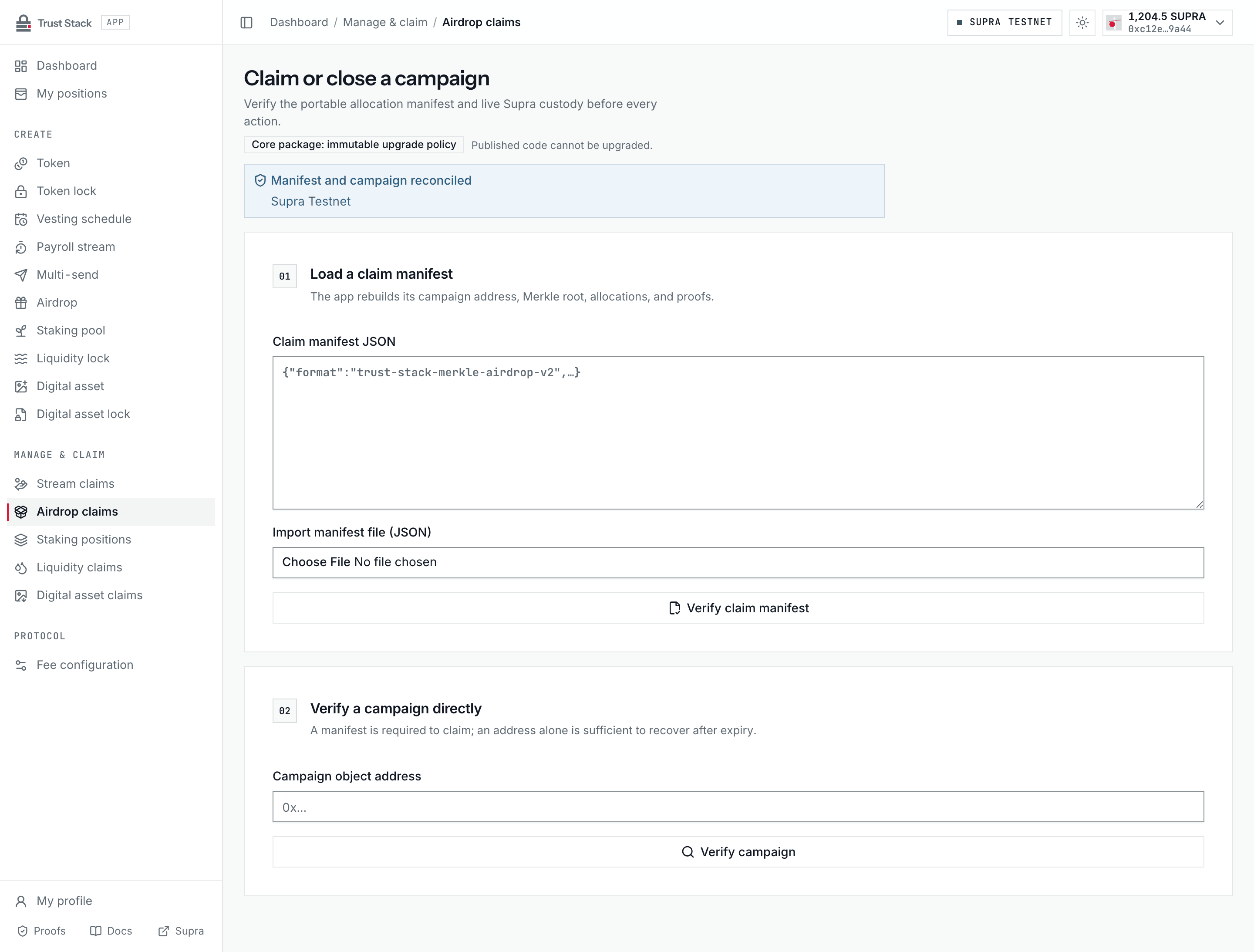
- Open Manage airdrop (Manage & claim > Airdrop claims in the dApp sidebar).
- Paste the Claim manifest JSON or import the manifest file.
- Let the dApp rebuild the campaign address, Merkle root, allocations, and proofs, and confirm that they reproduce the live campaign.
- Connect the wallet named in the allocation.
- Confirm the campaign, creator, Merkle root, live vault balance, claim window, and the wallet's unclaimed allocation.
- Select Claim allocation, sign in StarKey, and wait for the matching claim event.
- Confirm the index is marked claimed and the recipient balance increased by the exact allocation.
Only the leaf recipient can sign, only during the claim window, and each allocation index can be claimed once.
Recovery after the campaign#
The reclaim time is deliberately later than the claim end. After it is reached, anyone may submit the recovery transaction, but the contract sends the unclaimed balance only to the immutable creator. Triggering recovery does not let the caller choose a recipient. In the dApp, enter the Campaign object address under Verify a campaign directly (no manifest is needed) and select Return remainder to creator.
The first recovery closes the campaign to claims. In the active revision-6 package a later recovery sweeps any tokens that reached the vault afterwards to the same creator and aborts only when the vault is empty. The dApp offers only the first recovery; a later sweep is submitted directly to the contract. Campaigns on the retained claim-only revision-5 package keep its rule: a second recovery always aborts.
Proof binding and limits#
Every leaf binds the domain separator, campaign, token metadata, allocation index, recipient, and amount. This prevents valid proofs from being replayed across another campaign, token, wallet, or allocation. Proof depth is capped at 64, and the campaign seed is limited to 64 bytes.
Common problems#
- Manifest unavailable: the root cannot reconstruct missing proofs; contact the campaign creator.
- Manifest changed: reject it if the rebuilt root or independently shared hash differs.
- Wrong wallet: only the allocation recipient can sign.
- Claim window closed: claiming is no longer possible after the end timestamp.
- Already claimed: inspect the index and original transaction before assuming an application error.
- Creator cannot recover yet: the separate reclaim timestamp has not arrived.