Products
Tokens
Create a standard Supra Fungible Asset with clear supply controls, costs, and next steps.
On this page
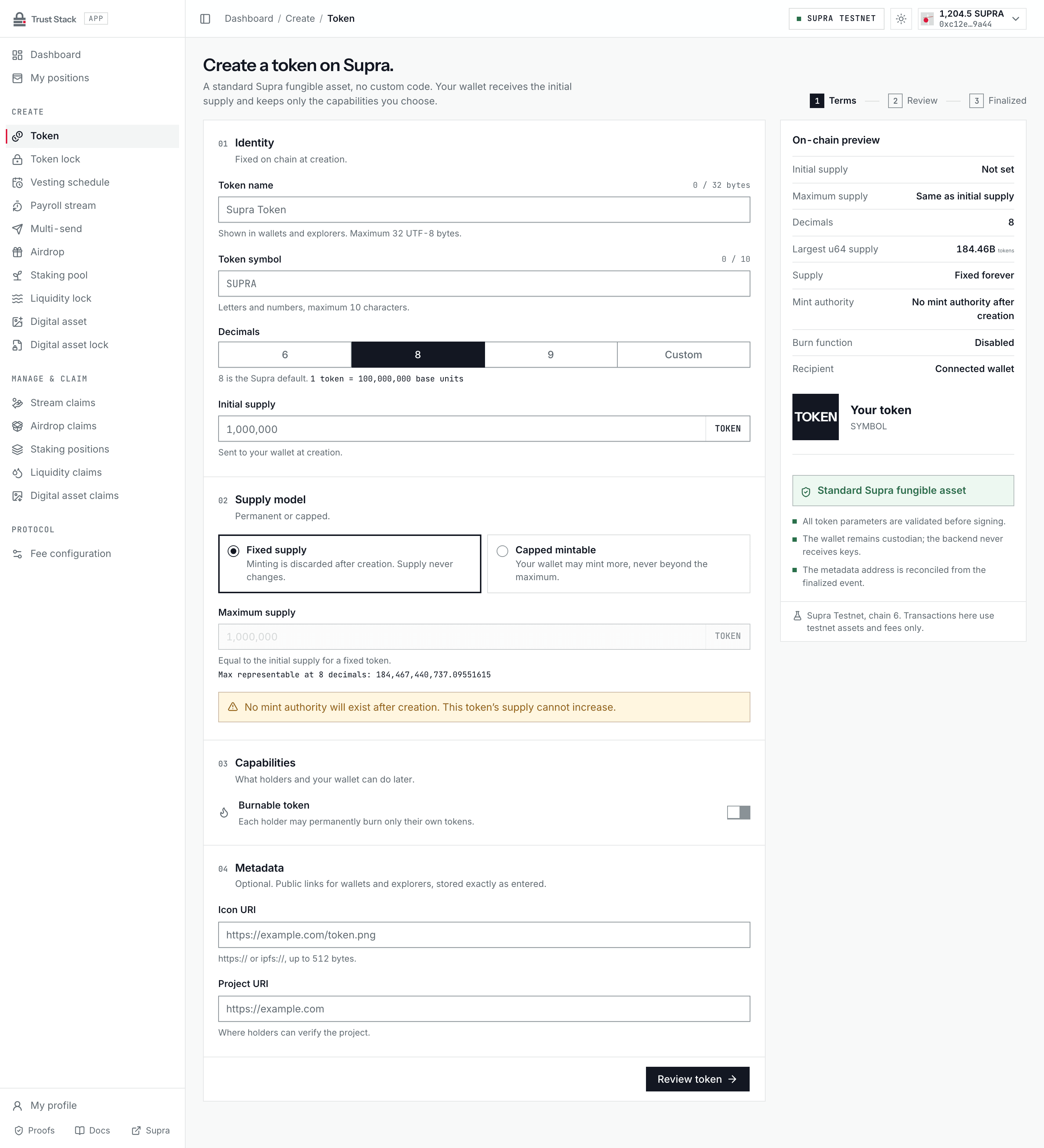
Token creation is for teams that need a standard Supra Fungible Asset without publishing a custom Move package. The factory creates the token, mints its initial supply, and returns a metadata object address that wallets, explorers, and every Trust Stack product use as the token address.
When to use it#
Use this product when you want to:
- create a fixed-supply token whose supply cannot be increased through the current controller;
- create a capped token whose controller may mint later, but never above its immutable cap;
- distribute, lock, vest, stream, airdrop, or stake the resulting Fungible Asset; or
- let holders optionally burn only tokens held in their own accounts.
It is not a token-sale contract, liquidity pool, bridge, tax token, blacklist, pause system, or administrator seizure mechanism.
Before you start#
You need:
- StarKey connected to Supra Testnet;
- enough SUPRA for the protocol fee, read live from the on-chain fee schedule, and network gas;
- the final token name, symbol, decimals, and supply model; and
- optional HTTPS or IPFS icon and project URLs.
Supply settings are economically important. A fixed-supply token and a capped-mintable token should not be presented to users as equivalent.
Create a token#
- Open Create token (Create > Token in the dApp sidebar) and connect StarKey.
- In Identity, enter the Token name, Token symbol, Decimals, and a positive Initial supply.
- In Supply model, choose Fixed supply or Capped mintable. For a capped token, enter the Maximum supply; for a fixed token it equals the initial supply.
- In Capabilities, decide whether Burnable token lets holders burn tokens from their own balances.
- In Metadata, add the optional Icon URI and Project URI. The On-chain preview updates as you type.
- Select Review token and inspect the proof sheet: network, initial supply and base units, decimals, supply model, maximum supply, holder burn, URIs, recipient and owner, and the live protocol fee.
- Select Create token and sign in StarKey. Do not treat a wallet submission alone as success.
- Wait for the finalized
TokenCreatedevent, then save the metadata address and transaction hash. Lock this token opens a token lock prefilled with the new metadata address.
Practical example#
Suppose a project creates Example Rewards (EXR) with 8 decimals, an initial supply of
1,000,000 EXR, and a maximum supply of 5,000,000 EXR.
- The creator initially receives
1,000,000 EXR. - The controller may mint up to another
4,000,000 EXR. - The cap can never be exceeded.
- If holder burn is enabled, Alice may burn Alice's EXR, but the controller cannot use that feature to burn Bob's balance.
If the project does not need future minting, selecting Fixed supply removes the current controller's mint path after creation.
Fees and costs#
| Action | Trust Stack protocol fee | Who pays | Other cost |
|---|---|---|---|
| Create token | Governed SUPRA fee, read live | Creator | Supra network gas |
| Later controller actions | None | Transaction signer | Supra network gas |
| Read token details | None | Nobody | None |
The creation fee is transferred only when token creation succeeds. If creation aborts, the protocol fee transfer and token creation roll back atomically, although the network may still charge gas for the failed transaction. The wallet signs a maximum acceptable fee, so execution aborts if the live fee exceeds the reviewed limit.
The fee is governed: the dApp reads it live from the on-chain fee schedule and shows the exact amount before you sign. The immutable cap is 25,000 SUPRA. Governance may move the fee within that cap; a proposed change applies only after the governance delay. On revision-6 testnet the fee governor is a single-key wallet, not a multisig, and the delay is shortened to 300 seconds for testing. Outside the allow-listed test chains the contract rejects delays below 48 hours, and the prepared mainnet payloads use 7 days. Always review the live amount shown by the dApp before signing. See Fee governance.
Supply models and authority#
| Model | What remains after creation |
|---|---|
| Fixed supply | The creation-time mint reference is discarded. The current controller state has no mint path. |
| Capped mintable | The controller keeps module-controlled mint authority up to the immutable cap. |
| Holder burn enabled | Each holder may burn only from that holder's own primary store. |
In the active revision-6 package the maximum supply caps lifetime minted supply: the initial mint
plus every later mint. Burning does not free room to mint again, and the total_minted view reports
the lifetime figure. Revision 6 also makes the token's metadata object untransferable; holders still
transfer the token normally. Tokens created on the retained claim-only revision-5 package keep its
rule, which caps only current supply, so burns reduce it.
Controller transfer uses a propose-and-accept flow. The current controller may irreversibly renounce mint or burn authority. Anyone evaluating the token should verify its current controller, cap, and capability state rather than relying only on its name or symbol.
Input rules#
- Name: required, at most 32 UTF-8 bytes
- Symbol: letters and numbers, at most 10 characters, normalized to uppercase
- Decimals: integer from 0 through 18; 8 is the common Supra convention
- Initial and maximum supply: exact decimal input that must fit a Move
u64after conversion - Icon and project URIs: optional HTTPS or IPFS values, at most 512 bytes
The form converts the human amount using the selected decimals. Review both the display supply and base units before signing; decimals cannot be changed after creation.
After creation#
Save and share:
- the metadata object address;
- the creation transaction hash;
- the supply model and maximum supply;
- the controller address and enabled capabilities; and
- the metadata URLs and their operational availability policy.
Creation is presented as complete only when the configured RPC returns a successful receipt whose event matches the reviewed identity, supply, creator, recipient, and capability flags. You can then use the metadata address in token locks, vesting, multi-send, and other products.
Common problems#
- Insufficient SUPRA: keep enough for both the protocol fee and gas.
- Supply does not fit: reduce the supply or decimals so the base-unit amount fits
u64. - Duplicate-looking token: identity comes from the metadata address, not the name or symbol.
- Unexpected mint risk: verify whether the token is fixed or capped and who controls minting.
- Transaction submitted but not shown: check the hash in SupraScan and wait for RPC reconciliation before retrying.