Products
Staking pools
Create or join a fully funded, time-weighted reward pool with isolated principal.
On this page
Trust Stack staking pools distribute a fixed reward budget over an immutable time window. Stake principal and reward funding live in separate untransferable vaults, and every participant receives an independent position object.
When to use it#
Use a pool when a project wants to reward users according to how much and how long they stake during a defined campaign. The reward budget is supplied upfront rather than promised by an administrator.
The current pool is intentionally simple. It does not provide validator staking, compounding, lock multipliers, early-withdrawal penalties, mutable emissions, emergency administrator withdrawal, or principal confiscation.
Before creating a pool#
The creator needs:
- standard, non-dispatchable stake and reward Fungible Assets (they may be the same token, because principal and rewards are held in separate vaults);
- the complete reward budget;
- future UTC start and end timestamps; and
- SUPRA for network gas.
The creator should publish the two metadata addresses, reward budget, schedule, and pool object so participants can verify the economics independently.
Create a pool#
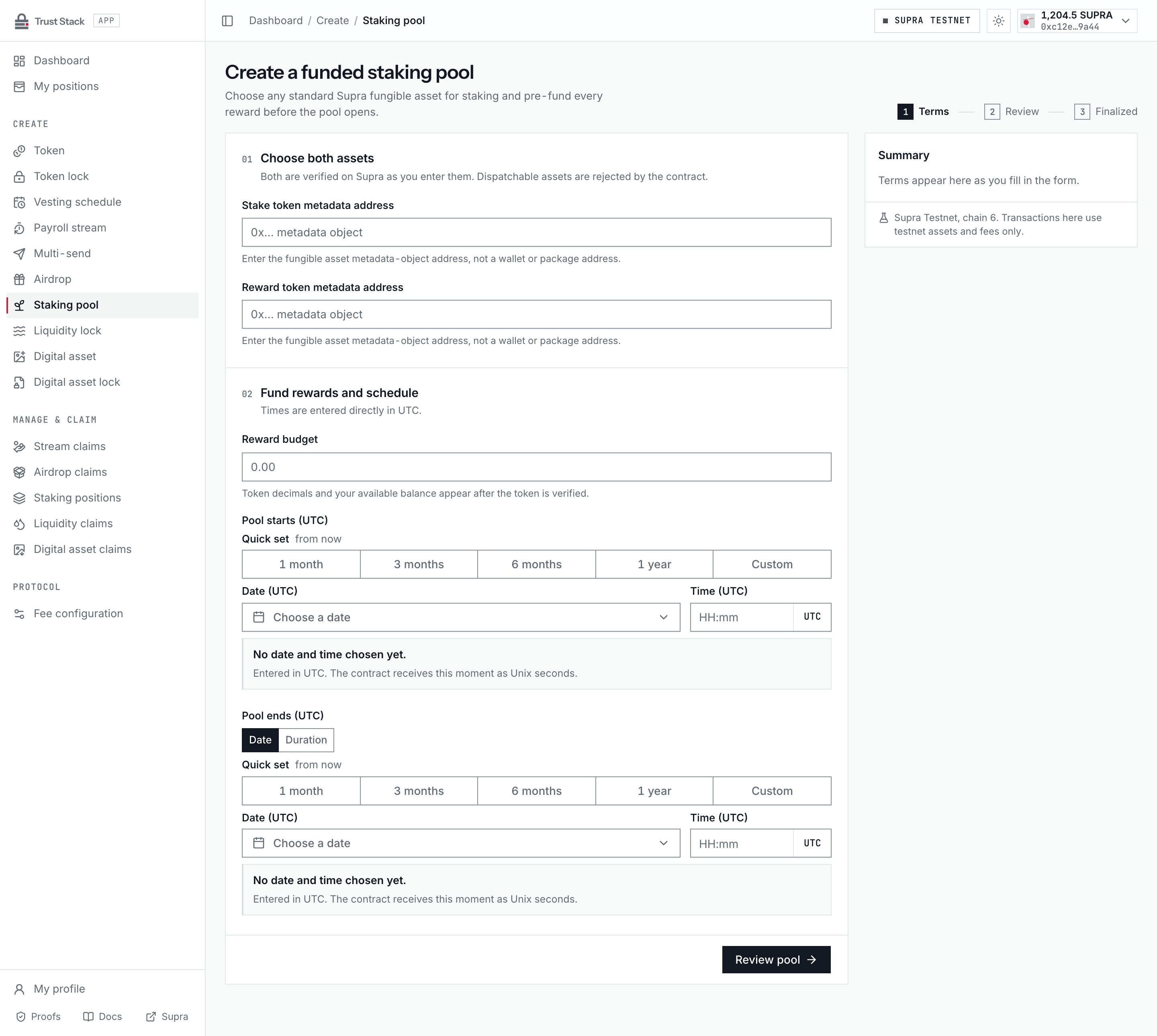
- Open Create staking pool (Create > Staking pool in the dApp sidebar) and connect StarKey.
- In Choose both assets, enter the Stake token metadata address and Reward token metadata address. Both are verified on Supra as you type, including their token origin.
- In Fund rewards and schedule, enter the full Reward budget and set Pool starts (UTC) and Pool ends (UTC) with the UTC date-time picker. The end can also be set as a duration from the pool start, and the start must be at least five minutes ahead.
- Select Review pool and check the recorded reward budget, stake and reward assets, start, end, duration, and emission rate.
- Select Fund and create pool and sign the pool creation transaction.
- Wait for the matching
PoolCreatedevent, save the pool object and transaction hash, and share the Stake link so participants can open the pool.
The reward budget transfers into its vault before the creation event is emitted. The contract cannot create an unfunded reward promise.
Practical example#
A project funds a 10-day pool with 1,000 REWARD tokens. Users stake STAKE tokens.
- If Alice is the only staker for the complete emission window, she earns approximately the full budget, subject to whole-unit rounding.
- If Alice and Bob stake equal amounts for the same complete period, they earn approximately equal shares.
- If Bob joins halfway through, Alice has more time-weighted stake and earns more.
- Withdrawing returns a user's entire principal and closes that position. Accrued whole rewards are reserved for the position and delivered by a separate reward claim, so an issuer-controlled reward asset can never roll back principal recovery. In the active revision-6 package, reward accounting can never block that principal withdrawal: any settled reward the pool allocation cannot back is forfeited instead of aborting. Reward claims keep their strict solvency check. Pools on the retained claim-only revision-5 package keep their original rule.
- Reward that was never allocated, because no one was staked, is recoverable by the creator after the pool ends. Integer dust becomes recoverable once total stake reaches zero.
The reward budget is a funded allocation, not a protocol fee. Staked principal is custody that is returned on withdrawal, not a payment to Trust Stack.
Fees and costs#
| Action | Trust Stack protocol fee | Who pays | Other cost or funding |
|---|---|---|---|
| Create pool | None | Nobody | Creator supplies full reward budget and pays network gas |
| Stake | None | Participant | Participant supplies principal and pays network gas |
| Claim rewards | None | Participant | Supra network gas |
| Withdraw and close position | None | Participant | Supra network gas; principal is returned, rewards stay reserved for a claim |
| Recover unallocated rewards | None | Creator | Supra network gas |
Trust Stack does not deduct a percentage from principal or rewards and has no early-withdrawal penalty. More frequent reward claims create more gas transactions but do not change a protocol fee. See Fee governance.
Stake and manage a position#
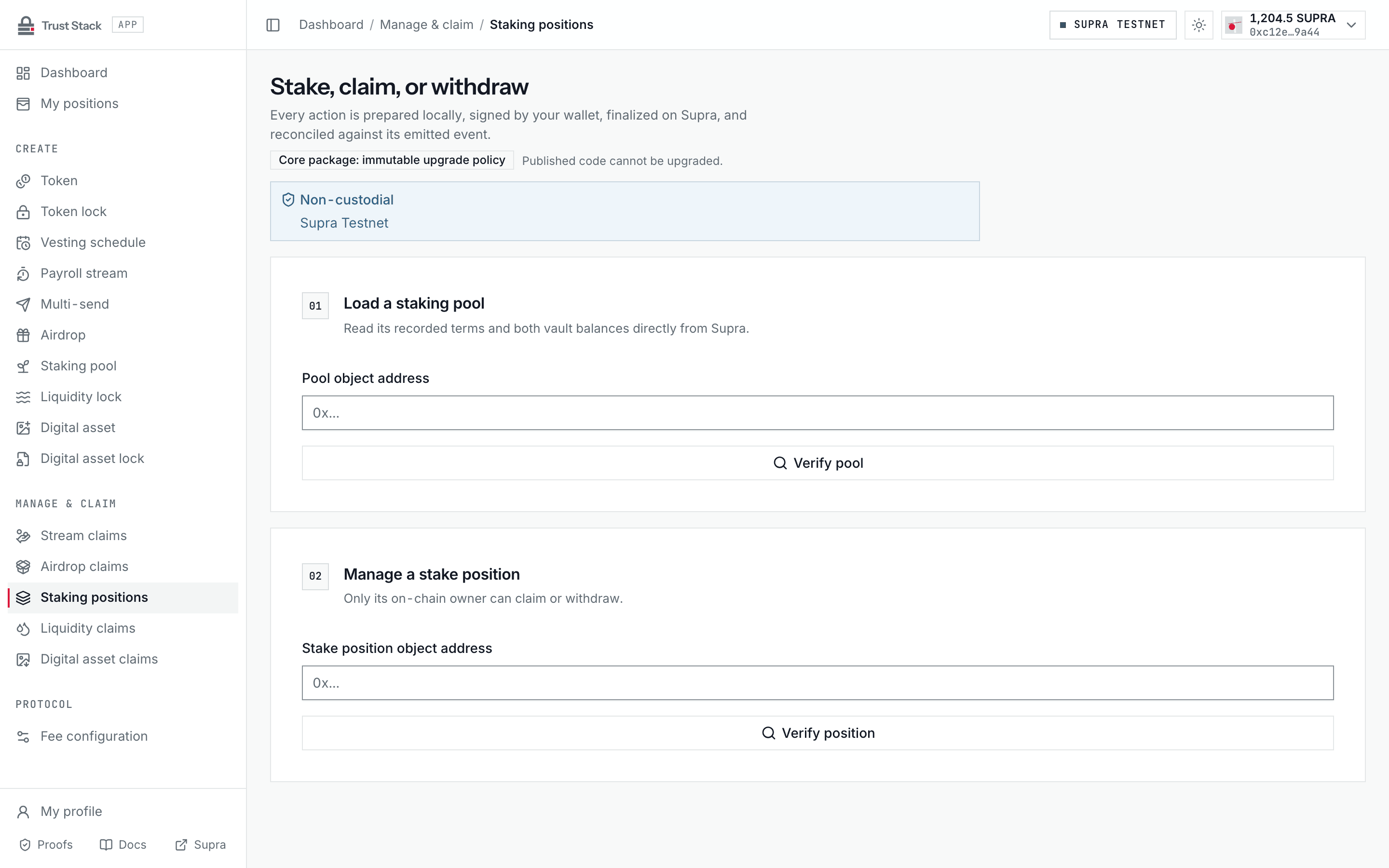
- Open Manage staking (Manage & claim > Staking positions in the dApp sidebar) or the pool's stake link.
- Enter the Pool object address and verify both assets, reward budget, schedule, and live vault balances read from Supra.
- Enter the Amount to stake, select Stake, and sign. Save the resulting position object.
- Return with the Stake position object address to review active stake and accrued whole rewards. Only the position's on-chain owner can act on it.
- Choose Claim rewards to receive accrued whole rewards while keeping principal staked, or Withdraw stake to receive the full principal and permanently close the position. After a withdrawal, use Claim rewards to collect the rewards reserved for the closed position.
Rewards use a cumulative reward-per-stake index scaled by 10^18. Fractional remainders remain with
the position so frequent claims do not create a rounding advantage.
Creator recovery#
After the reward window has ended, the creator may select Recover unallocated rewards on the pool's management page. The contract:
- protects every reward already allocated to stakers and not yet claimed while any principal remains staked;
- returns only rewards emitted during empty periods; and
- once total staked principal is zero, also returns integer-division dust while keeping every reserved reward claimable.
In the active revision-6 package, a further recovery without new dust aborts. The creator has no path to participant principal.
Common problems#
- Stake rejected: verify that the pool has not ended, the amount, and the participant balance.
- Reward looks small: rewards depend on both amount and time relative to all other positions.
- Fraction not claimable yet: only whole base units transfer; remainder stays accounted.
- Creator recovery unavailable: the pool has not ended or no unallocated reward remains.
- Position missing: use the saved position object directly while indexing catches up.