
Digital Assets
Upload content-addressed media and mint a standard one-of-one Supra Digital Asset.
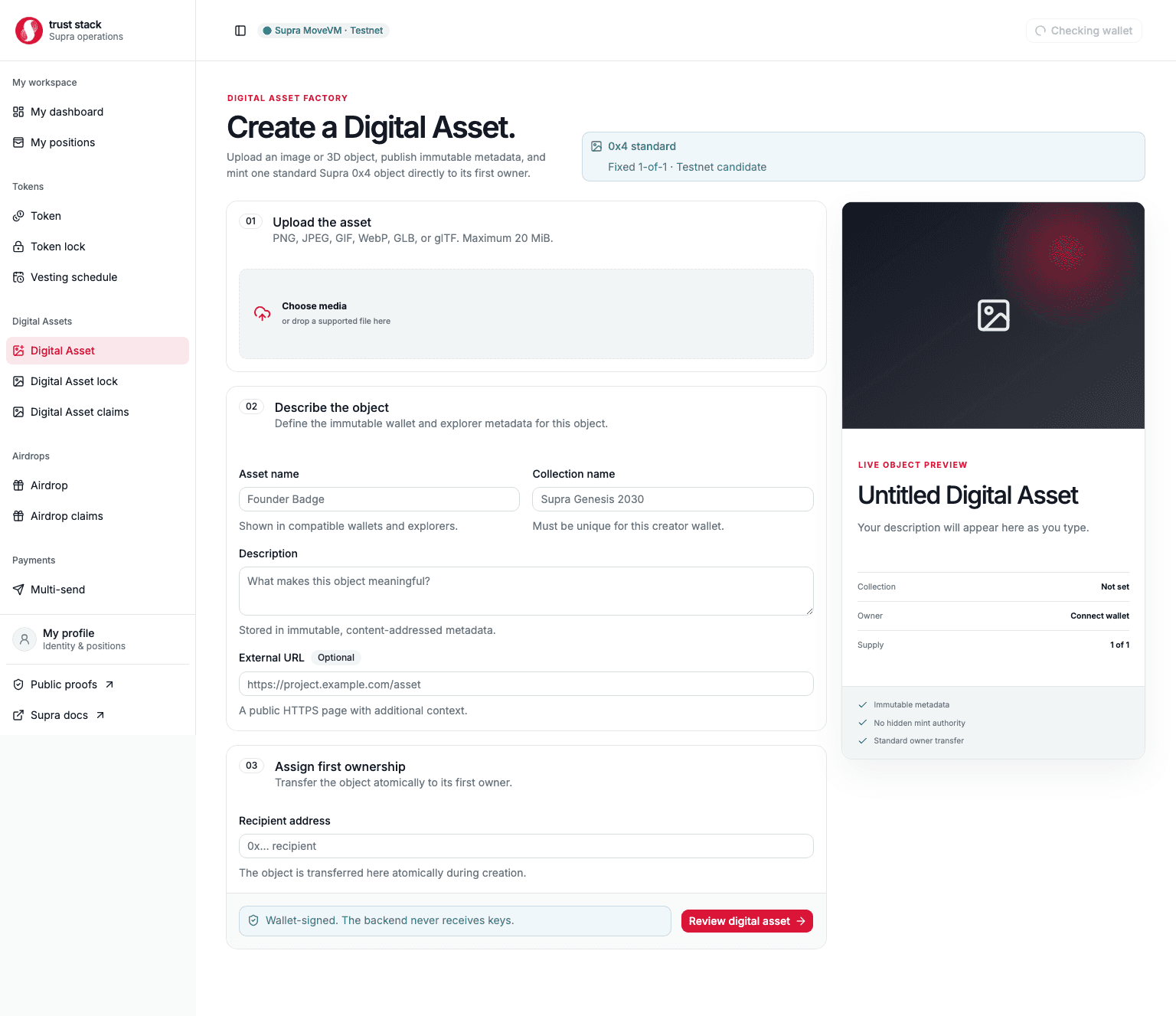
Digital Asset creation uploads bounded media, creates deterministic metadata, mints one standard
Supra 0x4 Digital Asset, and transfers first ownership to the chosen recipient. The media upload
and wallet-signed mint are separate steps; an upload alone does not create an on-chain asset.
When to use it
Use this product for a one-of-one standard object representing:
- an image, collectible, certificate, or artwork;
- a bounded GLB or glTF 3D asset;
- a content-addressed project item with a named first owner; or
- an asset that may later be transferred or placed in a Digital Asset lock.
This product is not a Fungible Asset, edition mint, marketplace, royalty engine, or guarantee that the linked media will be hosted forever.
Supported media
- PNG, JPEG, GIF, and WebP images
- GLB v2
- glTF JSON with a valid
asset.version - maximum file size: 20 MiB
For portable 3D assets, prefer GLB. The glTF path stores only the selected JSON file and does not automatically bundle external buffers or textures.
Before you start
Prepare the final file, asset and collection names, description, first-owner wallet, and optional HTTPS project URL. The creator needs StarKey on Supra Testnet and SUPRA for network gas.
Confirm that you have the rights to publish the media. Content addressing proves whether bytes changed; it does not establish copyright, authenticity, licensing, or legal ownership.
Create an asset
- Open Create Digital Asset.
- Select a supported local file and inspect the preview.
- Enter the asset name, collection name, description, optional project URL, and first owner.
- Upload the file. The media service verifies the bytes and stores them under a SHA-256 content address.
- Review the exact media URL, metadata URL, recipient, object standard, and costs.
- Sign the creation transaction in StarKey.
- Wait for a finalized
DigitalAssetCreatedevent matching the reviewed data. - Save the asset object, collection object, content hash, URLs, and transaction hash.
Practical example
A designer uploads launch-badge.glb, names the asset Launch Badge #1, uses collection
Launch Badges 2026, and assigns Alice as first owner.
- Uploading produces content-addressed media and metadata URLs but does not mint anything.
- The creator signs one on-chain creation transaction and pays network gas.
- Alice becomes the owner of the new Digital Asset object.
- The collection maximum supply is one, so this creation path cannot mint a second item into the same one-of-one collection.
Fees and costs
| Action | Trust Stack protocol fee | Who pays | Other cost |
|---|---|---|---|
| Upload supported media | None | Nobody | Hosting or storage cost is operational or provider-dependent |
| Create Digital Asset | None | Nobody | Creator pays Supra network gas |
| Receive first ownership | None | Recipient | None |
| Read or preview metadata | None | Nobody | Normal internet access only |
Trust Stack currently collects no creation percentage or fixed SUPRA fee for Digital Assets. The wallet still shows the Supra network gas estimate. A future external storage or pinning provider may have its own charges; those would not be contract protocol fees. See Fee governance.
Contract properties
- the collection has a fixed maximum supply of one;
- the standard transferable object is assigned to the requested non-zero recipient;
- the module retains no collection mutator, token mutator, burn reference, or issuer transfer reference; and
- collection names must satisfy framework uniqueness rules for the creator.
Creation is reported only after the finalized event matches the reviewed collection, asset, media and metadata URLs, recipient, and emitted object addresses.
After creation
Share the full object address and transaction hash—not only a screenshot or asset name. Anyone verifying the item should compare the current owner, object type, collection, metadata URL, and media hash. If the owner wants a timed custody commitment, continue to Digital Asset locks.
Common problems
- Unsupported file: convert it to a listed format and remain below 20 MiB.
- Broken glTF: use a self-contained GLB or make every external dependency durably available.
- Upload succeeded but no asset exists: the wallet mint transaction has not completed.
- Collection name conflict: choose a creator-unique collection name.
- Wrong first owner: stop before signing; the reviewed recipient receives first ownership.
- Media unavailable later: verify the content hash and follow the documented hosting recovery process; the contract cannot force an HTTP operator to retain bytes.
Availability remains operational
Content addressing detects mutation; it does not guarantee perpetual hosting. The immutable create-and-lock contract lifecycle passed on testnet, while production media durability still requires replicated storage, retention monitoring, and a fully recorded image-and-GLB lifecycle.